How to make a PWA in RingScript
Because a local-first app has to get onto the device.
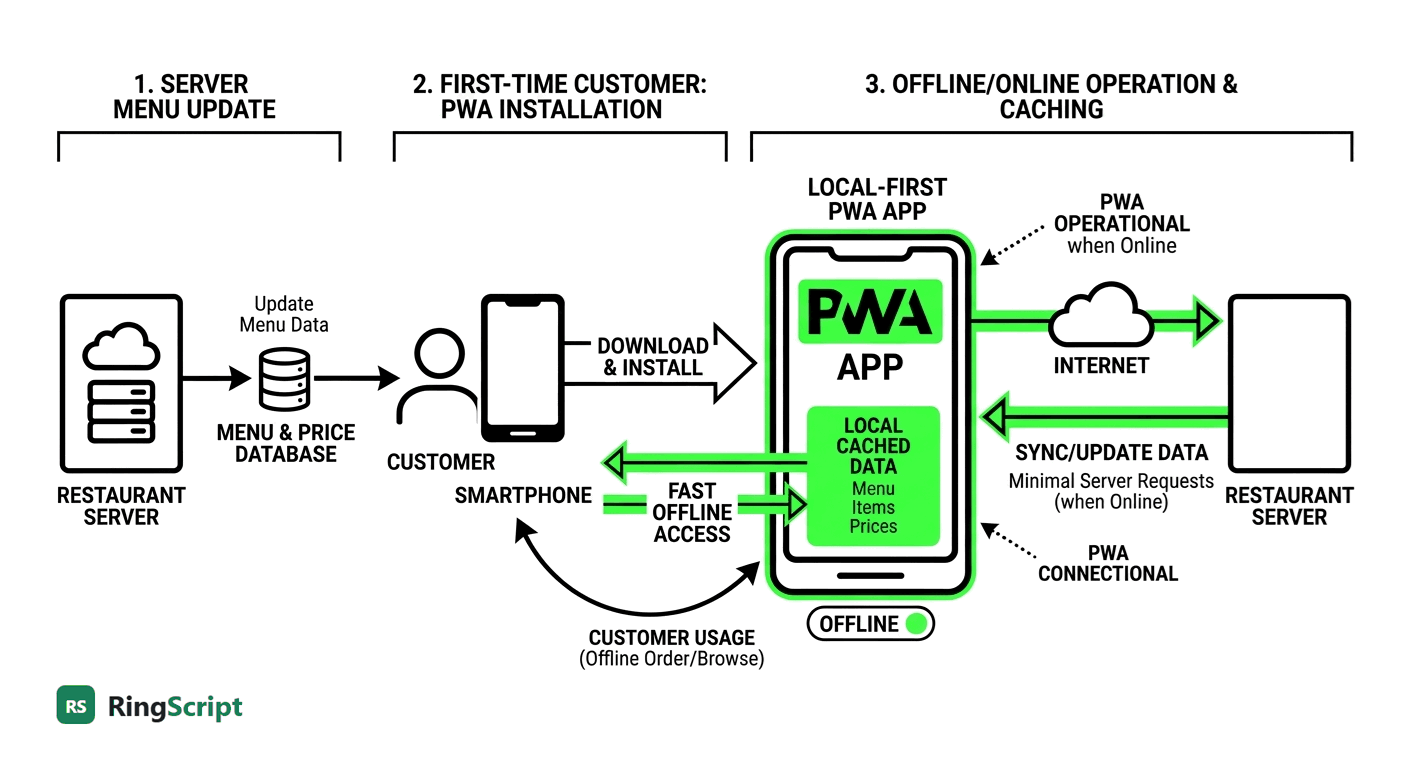
We have argued that the rules of a business application belong on the device rather than on a server. That argument has a hole in it, and it is worth naming: if the application is a web page, the device does not really have it. Every visit still asks the network for the app before it can start being independent of the network. A PWA closes that hole, and it turns out to fit RingScript almost too neatly.
The hole in the argument
Our first sample decides everything on the device: price tiers, the credit limit, the stock check. Cut the connection and it keeps working. That is real, and it is most of what matters.
But open it on a fresh phone in a shop with no signal and nothing happens at all. The rules are local; the app is not. Local-first without installation is a promise that only holds for people who already have the page open.
An application the user cannot start is not available, however well it would have worked.
What a PWA actually adds
Three pieces, none of them exotic, each answering a specific gap:
| piece | what it buys |
|---|---|
manifest.webmanifest | the app installs — a home-screen icon, its own window, no browser chrome |
| a service worker cache | it opens with no network, because the runtime and the rules are already on the device |
| Background Sync | finished work is pushed when a connection returns — even if the app is closed |
The third is the one a plain website cannot do under any circumstances, and it is the one that matches how field work really goes: you count the shelves, you put the phone in your pocket, you walk back into signal an hour later. Nobody reopens the app to let it sync.
The part that surprised us
A service worker caches URLs. RingScript is 397 KB of WebAssembly loaded
with an ordinary fetch — no streaming compilation requirement,
no SharedArrayBuffer, no cross-origin isolation headers. So it
caches like any other file:
var SHELL = [
	"./index.html",
	"./app.css",
	"./app.js",
	"./count.ring",              # the business rules
	"../../playground/ringscript.js",
	"../../playground/ringscript.wasm"   # the language itself
];
Note the last two lines. They live outside the app's own folder, and that is fine: a service worker's scope limits which pages it controls, not which resources it may store. So a shared runtime caches perfectly well from an app that does not contain it.
The whole application — interface, rules, and the language they run in:
| cached once | bytes |
|---|---|
ringscript.wasm | 396,604 |
ringscript.js | 39,366 |
| the app — HTML, CSS, JS, Ring, data, icons | ~33,000 |
| total | ~469 KB |
Under half a megabyte, once. After that the network is used for exactly one thing: sending finished counts.
The test that settles it
Claims about offline are cheap, so here is the one we ran. Open the sample, count an item, then stop the web server entirely — not throttle it, not toggle a devtools checkbox: kill the process. Then reload the page.
- The page loads. From cache.
- The 397 KB Ring runtime loads, and instantiates.
count.ringloads, and its rules answer as before.- The session comes back — the item counted before the server died is still counted, still flagged.
Nothing is reaching a server, because there is no server. That is the whole promise of the pattern, in a test anyone can repeat in a minute.
Where the division of labour holds
A service worker is JavaScript, and this is where it would be tempting to let it start making decisions — recompute a total before sending, validate a payload, drop a record that looks wrong.
It does none of that. The worker moves an already-decided payload and reports back whether the send succeeded. Every judgement was made in Ring, on the device, at the moment the user made it:
func StockCount cJson
	# ...
	nVar = nQty - aSkuExpect[nRow]
	nValue = nVar * aSkuCost[nRow]
	cVerdict = "match"
	if nVar < 0
		cVerdict = "short"
		if (0 - nValue) > nInvestigateOver
			cVerdict = "investigate"
		ok
	but nVar > 0
		cVerdict = "over"
	ok
One bag of rice short is 14,500 F, which is over the threshold, so it is not a miscount — it is a question for somebody. That rule is four lines a manager can read, and it runs in a back room with no signal. Putting it in the service worker instead would scatter the business across two languages and one of them would be the wrong one.
Stock Count
The sample: install it, cut the connection, count the shelves. Nine files, no build step, no framework. The service worker and the manifest are ordinary web development; the rules are Ring.
Open it Read the sourceTwo things we will not pretend about
navigator.onLine does not mean what you want. It
says the device has a network interface, not that your server answers. With
our server killed, the sample still reported "Connection: up", because the
browser could still see Wi-Fi. Treat it as a hint. The real test is whether
a request succeeded — which is why the outbox rolls back a failed send
instead of trusting a flag.
Background Sync is not everywhere. Chrome and Edge have it; Safari does not. The sample checks, says so in its own log, and falls back to flushing whenever it is open and online. That is the right shape for anything built on a capability the platform may not have: degrade, do not disappear. On iOS you still get installation and offline start — the two that matter most — and lose the unattended send.
Why this belongs here rather than in a framework
Nothing above needed a build step, a bundler, or a PWA library. A manifest is twenty lines of JSON. A service worker is a hundred lines of plain JavaScript. The reason it is worth writing yourself is the same reason the rules are worth writing in Ring: you can read all of it, and in five years you will still be able to.
Local-first has always been an argument about where decisions happen. A PWA is the part that decides where the application happens. Put them together and you get something a shop assistant in Maradi can open on a phone that has not seen a network since yesterday — which was the point all along.