RingScript has left Ring. It is no longer maintained on Ring: it is now a test project for Ring++, and the starting point for HaroScript, Haro's browser runtime. Why we left Ring →
Script your frontend in Ring. Not in JavaScript.
RingScript puts a real programming-language VM inside the browser — compiled to
WebAssembly, resident in the page. You write clear, boring, readable code. No build step,
no bundler, no node_modules, no framework to relearn next year.
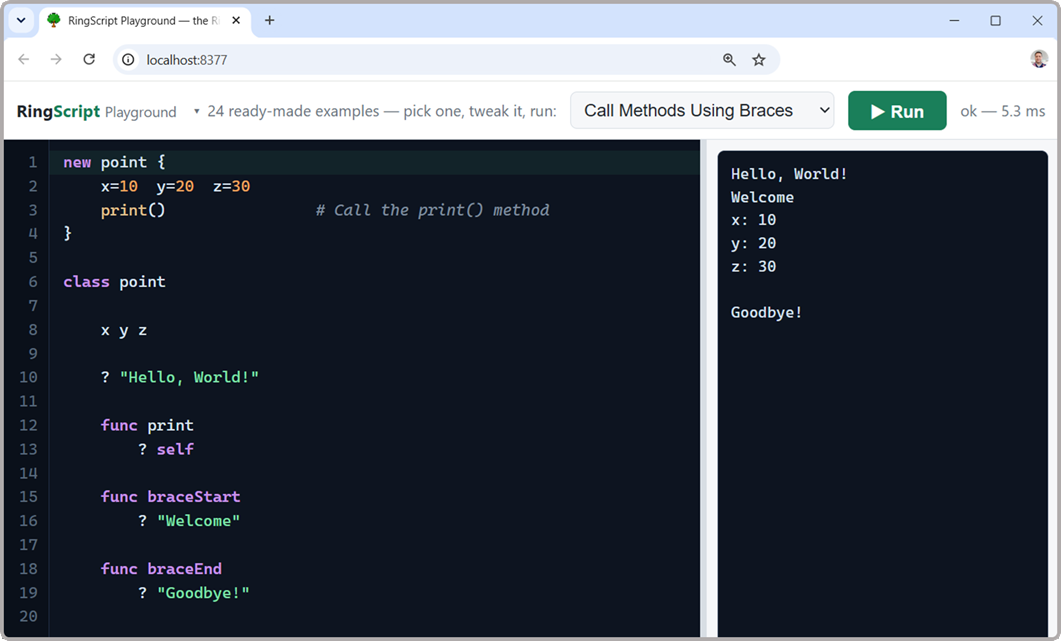
The Playground: pick an example, edit it, run it — the Ring VM is resident in the
page, and programs that ask for input pause and wait for your answer.
Open it in a new tab ↗
The same page, two ways
A name field, a greeting, a click counter. Below are the two versions of the
very same page — line for line, same length, same order — so the only thing that differs is
how the logic reads.
Both start from identical markup, and the Ring version adds two setup lines once per page:
<input id="guest"> // the markup, shared by both
<button>Greet</button>
<div id="hello"></div>
<scriptsrc="ringscript.js"></script>// Ring only: once per page<script>RingScript.boot()</script>
JavaScript13 lines
wire the listener, query the nodes, keep the state
let clicks = 0;

document.getElementById("go")
    .addEventListener("click", function () {
        const input = document.getElementById("guest");
        let name = input.value;
        if (name === "") { name = "stranger"; }

        document.getElementById("hello").textContent =
            "Ahlan, " + name + "!";

        clicks = clicks + 1;
    });
Ring13 lines
name the function, ask the page, say what you mean
No listener to register, no node to look up twice,
no closure to reason about: the button says ring.call('Greet') and the function
is called Greet. That is the whole trick — and it holds as the page grows.
What you get
◉
A resident VM
One virtual machine lives for the whole page. Define something in one evaluation,
use it in the next — variables, functions and classes simply stay.
◈
Errors that don't kill the page
A mistake returns a message with its real line number and the VM keeps running.
A thousand failing evaluations later, memory is still flat.
⇆
JSON both ways
ring.call("Price", {qty: 3}) goes in as JSON and comes back as JSON.
Ring can call your JavaScript too. The seam is thin — and optional.
❐
Two files, any host
A loader and a wasm module. Drop them next to your HTML on GitHub Pages, nginx,
S3, a shared host. No toolchain, ever.
⧉
Not a lookalike
It is Ring's own compiler and VM compiled to WebAssembly — verified to print
byte-identical output to the native interpreter.
✦
A language you can hold
Ring is small, dynamic and readable, with lists, OOP, declarative blocks and
natural-language syntax. Learn it in an afternoon.
What people build with it
The reason this exists: business applications whose rules
keep working when the connection does not. Two of them run on this site —
a field-sales order pad with a switch marked Cut the connection,
and a 20,000-record register measured against how a page has to feel.
The interface stays plain HTML and CSS. Your server stays
in whatever language it is already written in. What moves to Ring is the
part that decides — pricing, limits, validation — because that is
the part that must not need a network.
Get the two files. Easiest is the
starter kit — a folder that already runs, with a
launcher for your system. Or copy ringscript.js and
ringscript.wasm next to your own HTML; with Ring installed,
ringpm install ringscript from mayouni fetches them.
Boot it with one line — RingScript.boot() — which starts the VM
and runs every <script type="text/ring"> block on the page.
Write Ring. Call functions from your markup with
ring.call('Name'); read and write the page with Page().
Build an analog clock walks through all three,
start to finish.
Trust, measured
"It runs Ring" is a claim worth checking, so it is checked continuously
against the native interpreter — the whole official sample set and every code block in
Ring's documentation.
518
programs verified byte-identical to native Ring
0
mismatches across both corpora
86
gate checks on state, errors, memory, I/O, bridge
1.27
Ring version inside the wasm
And it is raced against Lua 5.4 and QuickJS under the same
discipline: four of nine scenarios won, five lost on the record with their
causes published — and on the row that matters most, ten thousand hostile evaluations
grow nobody's heap.
Two files, zero dependencies — because the dependencies are inside,
and their authors deserve their names on the front page: Mahmoud Fayed and the
Ring team's Ring
language and VM — the heart of the whole thing, vendored whole and verified
byte-identical, with the bugs found here contributed back and landed upstream; and
Andrew Kelley and the Zig team's
Zig, the one
toolchain behind everything — it compiles the VM to WebAssembly, builds the dev
server and the CLI, and cross-compiles the starter kit's binaries for five platforms
from a single machine. Half the Playground's examples come from the Ring team's own
Try Ring
Online, used here with thanks.
Honest limits
Inside a browser there are no files, no OS calls, no threads — the same rules
every web app lives by. Ring programs that ask for them get a clean, catchable error rather
than a dead runtime. Everything else in the language behaves exactly as it does natively.
RingScript is for page logic, business rules, teaching, notebooks and
offline-first apps. For heavy number crunching, keep using what you already use.